Difference between revisions of "Joban Modpack (New)"
From Joban Wiki
AmberFrost (talk | contribs) m (Disclaimer) |
AmberFrost (talk | contribs) (Clearer heading) |
||
| (7 intermediate revisions by the same user not shown) | |||
| Line 1: | Line 1: | ||
''Do not be confused with [[Joban Pack]], a proprietary Minecraft Resource Pack that is in use on our server.'' | ''Do not be confused with [[Joban Pack]], a proprietary Minecraft Resource Pack that is in use on our server.'' | ||
===== This article is for MultiMC, | ===== This article is for Vanilla Launcher, MultiMC/Prism Launcher, ATLauncher and HMCL user only. ===== | ||
Joban modpack is a publicly downloadable modpack that player may download, with all mods and server list pre-configured to join our server. | Joban modpack is a publicly downloadable modpack that player may download, with all mods and server list pre-configured to join our server. | ||
| Line 10: | Line 10: | ||
== Using the modpack to join our server == | == Using the modpack to join our server == | ||
=== | === MultiMC / Prism Launcher === | ||
The following setup instruction will require you to put the modpack link, you may '''copy''' the modpack link here for importing use: | The following setup instruction will require you to put the modpack link, you may '''copy''' the modpack link here for importing use: | ||
<code><u><nowiki>https://modpack | <code><u><nowiki>https://github.com/DistrictOfJoban/modpack-new/raw/current/modpack.zip</nowiki></u></code>[[File:Modpack install new.png|frameless|617x617px]] | ||
=== | === ATLauncher[[File:Modpack install at new.png|frameless|601x601px]] === | ||
=== | === Vanilla/Mojang Launcher === | ||
# Setup a '''Minecraft 1.19.4 w/ Fabric Modloader''' instance through whatever means. Using tools such as a Search Engine (e.g. Google) may help speed up the process. | |||
# Download the [https://github.com/DistrictOfJoban/modpack-new/raw/current/modpack.zip raw modpack here] | |||
# Extract the modpack zip file | |||
# Copy '''unsup.ini''' and '''unsup.jar''' into your '''.minecraft''' directory | |||
# '''For Vanilla Launcher:''' | |||
## Go to the '''Installations''' tab, then edit your Fabric installation by clicking the '''...''' button, then click "'''Edit'''" | |||
## Insert the following text to the start of the JVM Arguments Textbox: <code>-javaagent:unsup.jar</code> | |||
## Click '''Save,''' and launch the game again. | |||
=== | === '''HMCL launcher''' === | ||
# Go to All Instances[[File:HMCL Modpack Tutorial 1.png|534x534px]] | |||
# Click on Install Modpack, then click '''Download From URL'''[[File:HMCL Modpack Tutorial 2 new.png|453x453px]] | |||
# Paste the following modpack URL, then click OK: <code><u><nowiki>https://github.com/DistrictOfJoban/modpack-new/raw/current/modpack.zip</nowiki></u></code> | |||
# Click '''Install''' | |||
# Just launch and it should work :) | |||
Latest revision as of 16:56, 28 December 2025
Do not be confused with Joban Pack, a proprietary Minecraft Resource Pack that is in use on our server.
This article is for Vanilla Launcher, MultiMC/Prism Launcher, ATLauncher and HMCL user only.
Joban modpack is a publicly downloadable modpack that player may download, with all mods and server list pre-configured to join our server.
The modpack is set-up to always download and update to the latest mod version on launch via packwiz.
The repository could be found here
Using the modpack to join our server
MultiMC / Prism Launcher
The following setup instruction will require you to put the modpack link, you may copy the modpack link here for importing use:
https://github.com/DistrictOfJoban/modpack-new/raw/current/modpack.zip
ATLauncher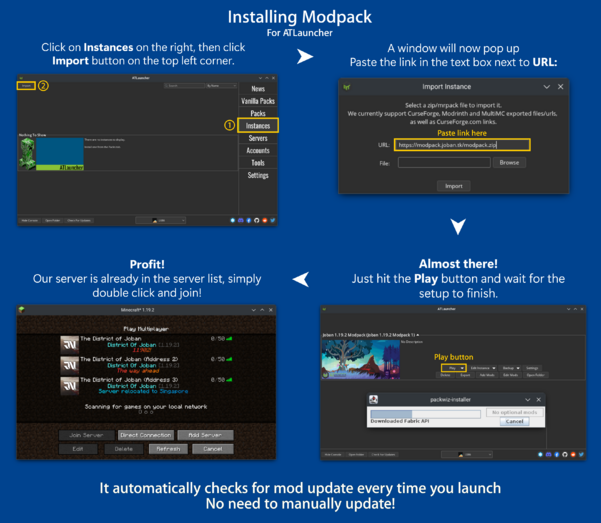

Vanilla/Mojang Launcher
- Setup a Minecraft 1.19.4 w/ Fabric Modloader instance through whatever means. Using tools such as a Search Engine (e.g. Google) may help speed up the process.
- Download the raw modpack here
- Extract the modpack zip file
- Copy unsup.ini and unsup.jar into your .minecraft directory
- For Vanilla Launcher:
- Go to the Installations tab, then edit your Fabric installation by clicking the ... button, then click "Edit"
- Insert the following text to the start of the JVM Arguments Textbox:
-javaagent:unsup.jar - Click Save, and launch the game again.
HMCL launcher
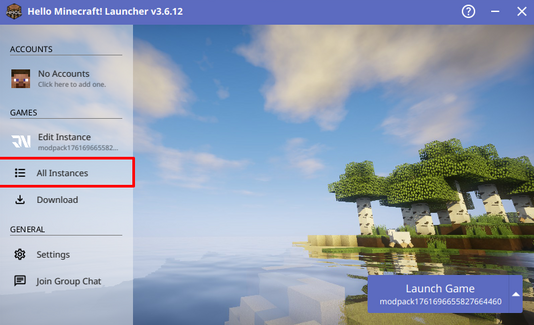
- Go to All Instances
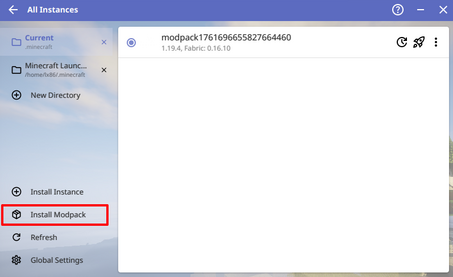
- Click on Install Modpack, then click Download From URL
- Paste the following modpack URL, then click OK:
https://github.com/DistrictOfJoban/modpack-new/raw/current/modpack.zip - Click Install
- Just launch and it should work :)

